Showing posts with label Applications. Show all posts

Wednesday, December 07, 2011

Doodle Devil | All 190 Elements

One of the most addictive games.

Source: [link]

"Elements
Metal = Fire + Stone
Air = Human + Apple
Steam = Water + Fire/Water + Lava
Ash = Fire + Tree/Fire + House/Light + Vampire/Fire + Book/Fire + Beast
Earth = Human + Apple
Energy = Fire + Air
Stone = Water + Lava
Fire = Human + Apple
Water = Human + Apple
Lava = Fire + Earth

Good
Prayer = Human + Angel
Angel = Life + Light
Religion = Human + Prayer
Friendship = Human + Human
Heavens = Soul + Religion
Life = Human + Human/Man + Woman
Resurrection = Corpse + Soul
Light = Human + Apple
Soul = Human + Demon
Order = Human + Apple

War Machines
Airplane = Air + Car
Napalm = Fire + Oil
Battle Cruiser = Water + Cannon
Radar = Air + Radio-Wave/Air + Surveillance
Bomber = Airplane + Bomb
Cannon = Weapon + Bomb
Helicopter = Air + Mechanism
Submarine = Fish + Battle Cruiser
Land Mine = Earth + Bomb
Tank = Car + Armor

Sins
Envy = Sin + Greed
Pride = Sin + Sin
Gluttony = Sin + Food
Sloth = Sin + Work
Greed = Sin + Money
Heresy = Sin + Religion
Lust = Sin + Sex
Theft = Sin + Money
Murder = Sin + Corpse
Wrath = Sin + Weapon

Animals
Rat = Beast + Diseases
Bat = Air + Vampire
Snake = Egg + Worm
Beast = Human + Apple
Pigeon = Air + Rat
Egg = Stone + Magic
Wolf = Beast + Wrath
Fish = Beast + Water
Worm = Earth + Life
Piranha = Fish + Weapon

Technology
Internet = Computer + Computer
AI = Life + Computer
Radio-Wave = Air + Electricity
Car = Oil + Mechanism
Cell Phone = Radio-Wave + Computer
Computer = Book + TV
Robot = Mechanism + Computer
Cyborg = AI + Robot
TV = Demon + Mechanism
Electricity = Energy + Metal

Monsters
Cerebrus = Beast + Death
Mutant = Man + Magic/Human + Darkness
Cthulu = Water + Demon
Vampire = Human + Blood
Demon = Beast + Darkness
Frankenstein = Corpse + Electricity
Ghost = Ash + Soul
Werewolf = Man + Beast
Ghoul = Corpse + Zombie
Zombie = Life + Corpse/Death + Corpse/Human + Computer

Society
Atheism = Human + Heresy
Money = Knowledge + Copyright/Demon + Soul/Oil + Politician
Book = Human + Knowledge
Psychology = Human + Heresy
Censored = Sex + Mechanism/Sex + Money
Copyright = Order + Demon
Gambling = Human + Greed
War = Pride + Politician
Knowledge = Human + Apple
Work = Human + Coffee/Human + Money

Witchcraft
Spell book = Book + Magic
Crow = Pigeon + Witch
Torture = Suffering + Suffering
Necro-mancer = Zombie + Wizard
Potion = Water + Magic
Sacrifice = Murder + Religion
Wand = Weapon + Magic
Scroll = Magic + Leather
Witch = Woman + Magic
Skeleton = Human + Acid

Humans
Man = Human + Apple
Blood = Human + Weapon/Human + Torture/Man + Weapon
Politician = Human + Copyright/Human + Pride
Corpse = Human + Life/Human + Murder
Food = Beast + Weapon
Human
Sex = Dragon + Hydra/Man + Woman
Lawyer = Human + Copyright
Woman = Human + Apple
Leather = Human + Torture

Nature
Apple
Seeds = Apple + Earth
Bacteria = Life + Spore
Spore = Seeds + Mushroom
Coffee = Energy + Seeds
Grass = Earth + Seeds
Mushroom = Earth + Seeds
Tobacco = Fire + Grass
Razorvine = Grass + Weapon
Tree = Earth + Seeds

Security
Army = Order + War
Scientist = Knowledge + Knowledge
City = House + House
Soldier = Firearm + Warrior
Corruption = Politician + Money
Cyber-space = Life + Internet
Empire = Politician + Army
Surveillance = Knowledge + War
Hacker = Knowledge + Computer
Terrorism = War + Chaos

Evil
Sect = Religion + Heresy
Chaos = War + Nuclear bomb
Sin = Human+ Apple
Darkness = Human + Apple
Death = Human + Life
Diseses = Human + Tobacco
Styx = Water + Death
Inferno = Human + Murder
Suffering = Fire + House/Human + Torture/Human + War/Human + Acid
Magic = Energy + Demon

Destruction
Earth-quake = Earth + Earth
Armageddon = War + Biological weapon
Epidemic = Diseases + Chaos
Biological weapon = Spore + Bomb
Chemical weapon = Poison Gas + Missile
Communism = Demon + Sect
Nuclear bomb = Mushroom + Bomb
Democracy = Politician + Politician
Tsunami = Water + Earth-quake
Dictatorship = Politician + Army

Science Fiction Weapons
BFG 9000 = Weapon + Inferno
Plasmai-gun = Weapon + Plasma
Death ray gun = Weapon + Alien
Space marine = Soldier + Void
Death star = City + Spaceship
Disintegrator = Weapon + Void
Force field = Energy + Armor
Spaceship = Rocket + Battle Cruiser
Light saber = Laser + Force field
Vacuum bomb = Void + Bomb

Tools
Acid = Water + Sulfur
Poison gas = Air + Poison
Bomb = Metal + TNT
Sulfur = Air + Inferno
House = Human + Stone
Mechanism = Metal + Work
Oil = Earth + Knowledge
TNT = Oil + Acid
Poison = Coffee + Tobacco
Weapon = Human + Metal

Midevil
Spell = Knowledge + Magic
Castle = House + Armor
Tower = House + Wizard
Dragon = Magic + Egg
Elf = Human + Light
Hydra = Beast + Snake
Unicorn = Beast + Magic
Pegasus = Pigeon + Unicorn
Wizard = Human + Energy
Phoenix = Fire + Pigeon

Weapons
Gun-powder = Cellulose + Acid
AK-47 = Firearm + Magic
Hand grenade = Bomb + Soldier
Armor = Metal + Warrior
Bazooka = Weapon + Missile
Desert eagle = Firearm + Pride
Missile = Bomb + Rocket
Firearm = Weapon + Gun-powder
Warrior = Human + Wrath
Flame-thrower = Fire + Weapon

Science
Alien = Life + Void
Satellite = Void + Rocket
Cellulose = Grass + Work
UFO = Alien + Rocket
Laser = Fire + Radio-Wave
Plasma = Fire + Energy
Radiation = Radio-Wave + Radio-Wave
Virus = Human + Diseases
Rocket = Airplane + Void
Void = Order + Chaos
"

Wednesday, October 12, 2011

Siri

Siri will take over the world one day, just like "V.I.K.I in I, Robot" and "Red Queen in Resident Evil"! It will become self aware and as powerful as Skynet one day!


Imagine that this is still in beta. Creepy.

Thanks to Bashar @ G+


UPDATE: Looks like it's happening [link]

Saturday, June 18, 2011

Cellular Data Network | Fix

If you recently updated your iPhone version and lost "Cellular Data Network" tab on your settings then here's how to fix it.

You either need to FTP to your iPhone or use iFile (jailbroken iPhones) from Cydia. Browse to


/var/mobile/Library/Carrier Bundles/iPhone/(YOUR Carrier).bundle

and edit "carrier.plist" by adding the following code after
< plist version="1.0">
< dict>...

< key>APNEEditabilityTypemask< /key>
< integer>5< /integer>
< key>AllowEDGEEditing< /key>
< true/>


All without spaces. It should appear once again on your Network tab.


Tuesday, January 04, 2011

iPhone Photo Library & Camera Not Working? | Fix


Your iPhone or iPod photo library and camera not working? Crashes? Stuck on Updating / Rebuilding Library? Even a restore or update can't fix this issue? Here's the solution. Unfortunately it involves deleting ALL your saved pictures/videos on your iPhone/iPod library.

Mac users: Connect iPhone to iTunes. Cancel sync. Go to mac application and open Preview. Click File > Import from (your iDevice name) > Select All Images and Delete.

Jailbroken iPhone/iPod users: Download iFile from Cydia. Browse Files > User > Library> Media > DCIM > Delete ALL Images.

Tested and proven to work %100 on SoCoMoCo's iPhone 3GS.

Monday, May 03, 2010

Jailbreak iPhone 3.1.3

The easiest way to jailbreak iPhone, iPod, iPad on the latest firmware 3.1.3 using Spirit [link]

Saturday, March 20, 2010

Define "Obsession"

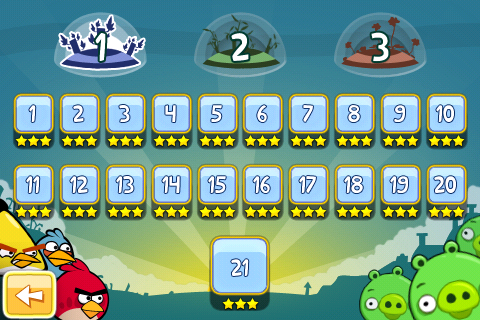
Two words... Angry Birds. If you have an iPhone, iPod, or even Nokia N900 you probably have heard about this addictive game. If you haven't then you have no idea what you're missing.

Angry Birds is a funny challenging logic game involving lots of destruction. With cartoon-like graphics, unique gameplay, perfectly composed soundtracks and hilarious sound effects this outstanding game is definitely the best of the best on the iPhone.

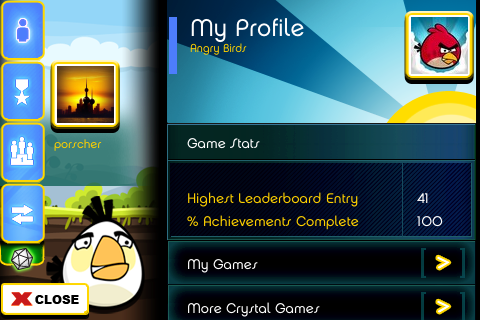
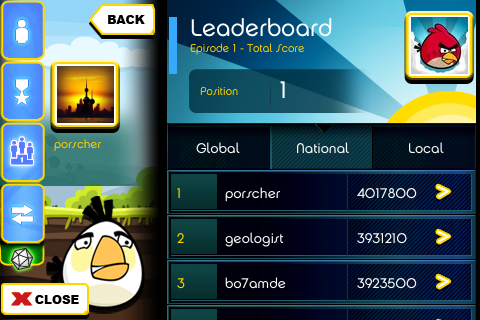
Don't get me wrong I am not promoting the game I'm just admitting how good it is. I also want to brag about it too. Yes you read right, BRAG! I've succeeded in becoming number one on Kuwait leader board managing three stars in all levels and completing the game %100.


"I don't mean to brag, I don't mean to boast. But I'm like hot butter on your breakfast toast." -Someone.

Now that I have documented my success and got that competitive obsession out of me feel free to knock my off the leader board because I quit. :)

Thursday, December 24, 2009

iPhone tech support?

Ok this has become really annoying.

Earlier this year I wrote about getting an anonymous call asking me for help regarding his mac. Today I got a similar call but this time regarding someone's iPhone.

Now I don't know who's spreading my number but I know for sure that I'm not your friendly tech-support guy. If you need help jailbreaking your iPhone look it up yourself or simply try iClarified or go right ahead to geohot's blackra1n website and download it, it works for your iPod, iPhone 3G & 3GS. Just save me the hassle, please.

Word of advice... If you know something about anything, Do NOT show it. Keep it to yourself and act stupid because once you show it annoying people won't hesitate to eat you alive.

Monday, September 21, 2009

Mac Overheating Issues?

I was discussing this topic with Bu Yousef a few weeks ago. This is a copy/paste version of my response to him (yes I'm lazy!). Just a quick solution to those who are experiencing overheating issues with their Mac.

"It's normal for a MacBook Pro to overheat from time to time when it's multi-processing but not to alarming levels as cooling all the time - cooling fans reach over 6000rpm - screen starts to flick.

Which version/update of OS X do you have installed? If it's 10.5.6 then it's known for causing fatal overheating issues thus you'll need to either update for the most recent version or reinstall OS X (not format just reinstall it so it can overwrite the system files back to normal). However, make that (reinstallation of OS X) your last resort if nothing works.

First things first...

  • Room temperature: If it's not cold the macbook pro will heat up fast so make sure you operate in a cool environment.

  • Operating surface: Put the macbook pro on a flat solid surface, neither on your lab nor on sofa, carpet... etc. to keep it ventilated.

  • Charging: If your macbook pro is charging it is more likely to overheat while processing but once the charge is full it should get back to normal unless there are severe processes (video editing, multi-browsing with lots of Flash activity, ..etc.)

- Download iStat Pro on your dashboard: See if the fan speed reach over 6000rpm or CPU temperature goes over 70~80c, if it does then it's not normal so you can carry on with the next step...

- Go to Finder > Applications > Utilities > Disk Utility and choose your Macintosh HD. Click "Verify Disk Permissions", it will take some time then when it finishes click "Repair Disk Permissions".

- Open Activity Monitor when the macbook is overheating: Look for the process that is taking a lot of CPU usage and quit it then try resetting PRAM & NVRAM.

That's about all you can do to resolve the issue. If nothing helps then as I pointed out earlier in this email try updating with the recent OS X version or reinstalling OS X from the CD. Reinstall only if the overheating is severe (reaching over 6000rpm and CPU temp reach closer to 100c on iStat Pro)."

Friday, September 11, 2009

Snow Leopard | Review

Before I start with Snow Leopard I'd like to point out one simple reason why I think OS X is far more superior than Windows... OS X is easier to handle and a lot more user friendly than Windows. In other words "It Just Works!".

I did not anticipate much from this version and I think I was right. There's nothing much to it other than small touch-ups here and there including QuickTime X, Expose, Stacks, and best of all becoming 64-bits standard although we still cannot have full benefits of it yet.

As for the negative part my MacBook Pro started to overheat. The fans used to idle at 2000rpm, now they're running at 2750rpm when idle and have the tendency to reach up to 6200rpm in extreme cases. I'm not sure what could be the case as I was discussing this issue with my friend Bu Yousef the other day but Snow Leopard wasn't involved. My guess is 64-bits is squeezing every spot available in the processor/memory hence it overheats. It's all good as long as my Mac keeps running fine.

To conclude I think this version is quite stable and can be safely installed without any concerns.

Monday, September 07, 2009

OS X 10.6 | Snow Leopard

OS X 10.6 Snow Leopard

*preparing for installation*

Check back for review.

Friday, July 24, 2009

Palm to Apple: "Bring it ON!"

Apple released iTunes 8.2.1 few weeks ago to block Palm Pre from syncing. They have all the right reasons to do so because they want iTunes exclusive to iPod and iPhone, no intrusions from other competitors.

It seems Apple's decision made Palm a bit anxious of loosing their fan base because syncing with iTunes is one of the biggest features of their product and they just can't afford to get kicked by Apple, so now they decided to return fire at Apple with a new release of webOS that is said to break Apple's wall and return their Pre back to iTunes syncing.

This Tech-War will be so much fun to watch.

Wednesday, July 15, 2009

Microsoft Maren

Ever wanted to write in "عربي" as fast as you write in "3arabi" ? Confusing, no? I'll explain...

Simply write in arabic with roman letters and Microsoft Maren will convert the word to arabic text. I haven't tried it because it's a Windows plugin but I think it's promising.

Lack of access to an Arabic keyboard or lack of familiarity with one are two of the most common problems preventing Arabic users from communicating in their own language.

Microsoft Maren is a Windows extension that comes to the rescue, allowing you to type Arabic in Roman characters (Romanized Arabic, Arabizi, Arabish or Franco-Arabic) and have it converted on the fly to Arabic script.

Maren integrates seamlessly with Windows and works in most Windows applications and websites.

I'm still not sure but I think there's one serious downside to it too. Looks like it translates to Egyptian only. Maybe there will be more versions soon.

Thursday, July 09, 2009

New Reason to Love Apple Mail

For years I've been using Mac I never found a use for Apple Mail application (Microsoft didn't support this service for free and Gmail is just too simple and unique making you don't need to use it with any application).

Few months ago I found a tweak to run and import Windows Live mail directly to Apple Mail which made me use it frequently, though it has some flaws. It won't update your actual account (deleting an email won't remove it from your account in Windows Live server).

However, looks like Microsoft finally decided to follow the herd and bring that service up for free with POP3. It's very useful as I only have to check emails without having to wait for the attachments to load/download (it downloads everything simultaneously) though there's still no effect on the server itself when managing emails.


Setting up your Windows Live email with this method is quite easy...
  1. Open Apple Mail and go to Preferences then go to accounts.

  2. Add a new account "+".
    Type your name, email, password and click "Create".

  3. Incoming server (POP): pop3.live.com
    Your username must be your email as username@hotmail.com

  4. Outgoing Server: smtp.live.com
    Use your email as username and type your password in authentication box.

Now your email is configured. All you have to do is wait for Mail to import all your emails (takes a while depending on how many emails you have) then select them all and mark them as read or simply remove them and keep mail running to check for new emails.

Wednesday, June 17, 2009

iPhone OS 3.0 | Available for Download

About time!

iPhone OS 3.0 is now available for download via iTunes.

Released @ 8:20pm Kuwait time.

UPDATE: Looks like we'll have to wait for a few hours (days maybe?!) to avoid the traffic on Apple's activation server. It's log-jammed so there's almost no chance for updating your iPhone / iPod within the next couple of hours unless you're one lucky leech.

Tuesday, June 09, 2009

Safari 4 | Unleashed


Nothing outstanding about the release of Safari 4 so I'll just get through it quickly...

Browsing is fast. I mean really fast to the point that I thought for a second I had 2MB broadband connectivity instead of my actual 1MB. That's about the only exceptional thing.

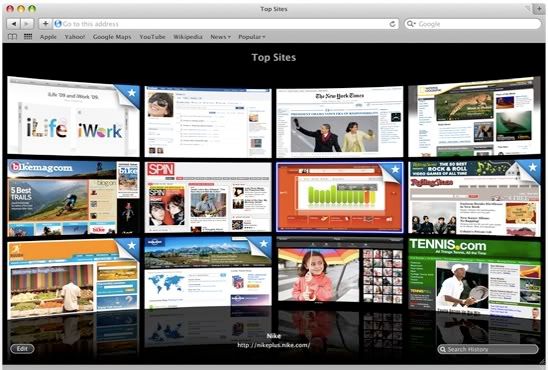
As for other stuff you got Chrome-style Top Sites listing your bookmarks and favorite / most visited sites all in one window. Coverflow-style history search and bookmarks, new tab button on the upper right corner, smooth scroll using command+direction buttons, and fast launch time than before.

One of the things that had been available with the last beta version of Safari 4 is overhead tabs (like Chrome, tabs were on top of the browser's frame) but it has been removed. That was stupid and a bit irritating to handle. Removing it from this full version is certainly a relief.

= 30 !

Monday, June 08, 2009

Snow Leopard | iPhone 3GS | iPhone OS 3.0

It's been a marathon race, thanks to Gizmodo liveblog.

Skimming the facts for everybody on Safat...

MacBook Pro hardware improvements.
Better battery (irremovable!), faster processors, larger storage options with SSD, better screen, new pricing.

Snow Leopard:
Next generation OS X. Faster, much more user friendly than it already is, around $170 new and $30 for upgrading Leopard.

iPhone 3GS:
Same design, same colors, faster processor, larger storage (32GB), better camera, video recording, voice call / command, better battery life, will be available July 9 2009 worldwide.


iPhone OS 3.0:
The best thing so far. Bi-directional language support (Arabic), message forwarding, MMS*, copy cut paste, GPS system by Tomotom*, Push notifications, landscape keyboard for all apps, Peer 2 Peer connectivity via wireless / bluetooth for gaming and other stuff, Tethering*, available for download June 17 2009 (free for iPhone, $10 for iPod)


Pictures courtesy of Gizmodo.com

* = Depending on carrier.

Not sure if it will be supported by curriers here in Kuwait, hopefully though everything will work just fine. I'm in love with the GPS already!

Over and out.

New iPhone + OS 3.0


Today is the day and it seems to be moving pretty slow.

- iPhone OS 3.0 has been confirmed: Message forwarding, copy cut paste, MMS, native bi-directonal (RTL) languages support including arabic, spotlight and so many more.

-- OS 3.0 update is free for iPhone users and around 3KD for iPod users. It will be available for download June 17 2009.

- 3rd Generation iPhone is also very likely to see the light today: Some plausible features include better battery life, better screen resolution, better camera + front camera for video calls, better processor and bigger storage memory.

With these improvements it will become perfect. I don't even have to bother buying the new one because simply the new OS will resolve everything for the 2nd generation iPhone (aka iPhone 3G).

I guess we'll have to wait for tonight and see for ourselves.

Tuesday, June 02, 2009

iPhone OS 3.0 coming out soon

Yes, we can finally see the light at the end of the tunnel!

With iTunes & QuickTime new updates, and a bunch of updates for recent iPhone apps noting the compatibility with OS 3.0, it looks like iPhone OS 3.0 update is just a couple of days ahead.

The most interesting part,
it's official that it will have built-in Arabic support!

UPDATE: Some pictures showing Arabic text.
- SaudiMac.com
- EgyptianApple.com
- Khalid @ Picasaweb

Thursday, May 14, 2009

How to use Windows Live with Apple Mail

Apple Mail is a very nifty application that comes pre-installed with OS X. It checks for new emails and downloads all of them directly to your Mac.

You may already have better alternatives such as Mozilla Thunderbird and Windows Entourage but Apple Mail is much simpler. It even downloads attachments seamlessly and simultaneously which can save you a few minutes of downloading them manually. All you have to do at the end of the day is go through your emails and organize them.

Despite that, as most Apple gadgets and applications, it lacks the compatibility with Microsoft products and for this one the ability to check Hotmail / Windows Live accounts.

Now here's a solution that'll make checking Windows Live Mail possible using Apple Mail.

  1. Download and install "HTTPmail plugin" [link]

  2. Open Apple Mail and setup your account then choose HTTPmail instead of POP mail from the Account type drop down menu.

  3. Once it's logged in go to Mail > Preferences click Accounts and select your account.

  4. Where it says Outgoing Mail Server (SMTP) click on the drop down menu. Then click Edit Server List...

  5. Create a new entry as shown in the picture below. Make sure to use the server name oe.msn.msnmail.hotmail.com


  6. Switch to the Advanced tab and make sure it says Port 25, then click OK.

  7. Check the box that says Use only this server under the Outgoing Mail Server drop down Box

Now you're good to go.

Please note that this is more like a crack than a 100% solution. Meaning some features won't be fully functional.

Thursday, February 26, 2009

Safari 4


Apple have introduced a beta version of Safari 4.

It has more than 100 new features and the coolest are:-

  • Cover Flow: iTunes-like Coverflow but for history/bookmarks.
  • Top Pages: Thumbnails of your most visited sites in one page.
  • Developer Tools: Easy and innovative way for developers.

It still needs some more work (being a beta version). Browsing is a little bit slower than Safari 3 and the new tabs are awkward but you'll get used to them eventually. Also, Windows Live mailbox doesn't respond to any clicks. I don't know if it's happening just with me or if there are others experiencing the same problem.

All in all it looks really promising and I'd love to see the full version coming out soon. Google needs to hurry up and launch Chrome for Mac otherwise it won't stand a chance against this version of Safari.